Two things people mean by "auto follow back"
| What people mean | What it actually does | Where it lives |
|---|---|---|
| The Instagram setting | On a private account, automatically approves a follow request from someone you already follow. Nothing goes out from your account. | Instagram app, profile menu, follow and invite settings |
| A follow-back tool | Follows the people who recently followed you, one by one, with delays and a daily limit, so you do not tap Follow a few hundred times by hand. | A browser extension such as AutoFollow, running in your own Chrome tab |
Most searches for auto follow back on Instagram come from one of two situations: someone with a private account noticed that new followers appear without ever approving them, or someone with a growing account wants to return the follows without spending an evening on it. The rest of this page handles each in turn.
The Instagram setting: automatic approval, not automatic following
Instagram gives private accounts an option that confirms follow requests automatically when the request comes from someone you already follow. In the app it sits under your profile, the menu, and the follow and invite settings; the exact label changes between app versions, so look for the word automatically next to confirm or approve, and treat the Instagram Help Center as the source of truth for your app version (this description follows third-party guides from 2026). Public accounts do not have it, because public accounts do not approve followers at all.
Three things matter about this option:
- It only works inward. It accepts people. It never sends a follow from your account, so it cannot grow your following list or get you follow-backs.
- Turning it off is not retroactive. People it already approved stay in your followers list. If you want some of them gone, remove them from Followers, one by one.
- If followers still appear on their own after you switch it off, an app connected to your account is doing it. Open your settings, go to Website permissions and then Apps and websites, review the Active list, remove anything you do not recognize, and change your password.
That last point is worth taking seriously. Any service that asks for your Instagram password and promises followers can follow, unfollow and message from your account whenever it likes. It is also the fastest route to an action block. A browser extension that works inside your own logged-in tab never needs the password; that is the whole difference between the two kinds of tools, and why AutoFollow is built that way.
How to follow back your new followers in bulk, safely
Following back by hand is fine at ten a day. At two hundred new followers a week it becomes a chore people stop doing, and a follow-back left unanswered for weeks is a lost connection. Here is how AutoFollow does it; the same logic applies to any tool that follows the followers of a profile.
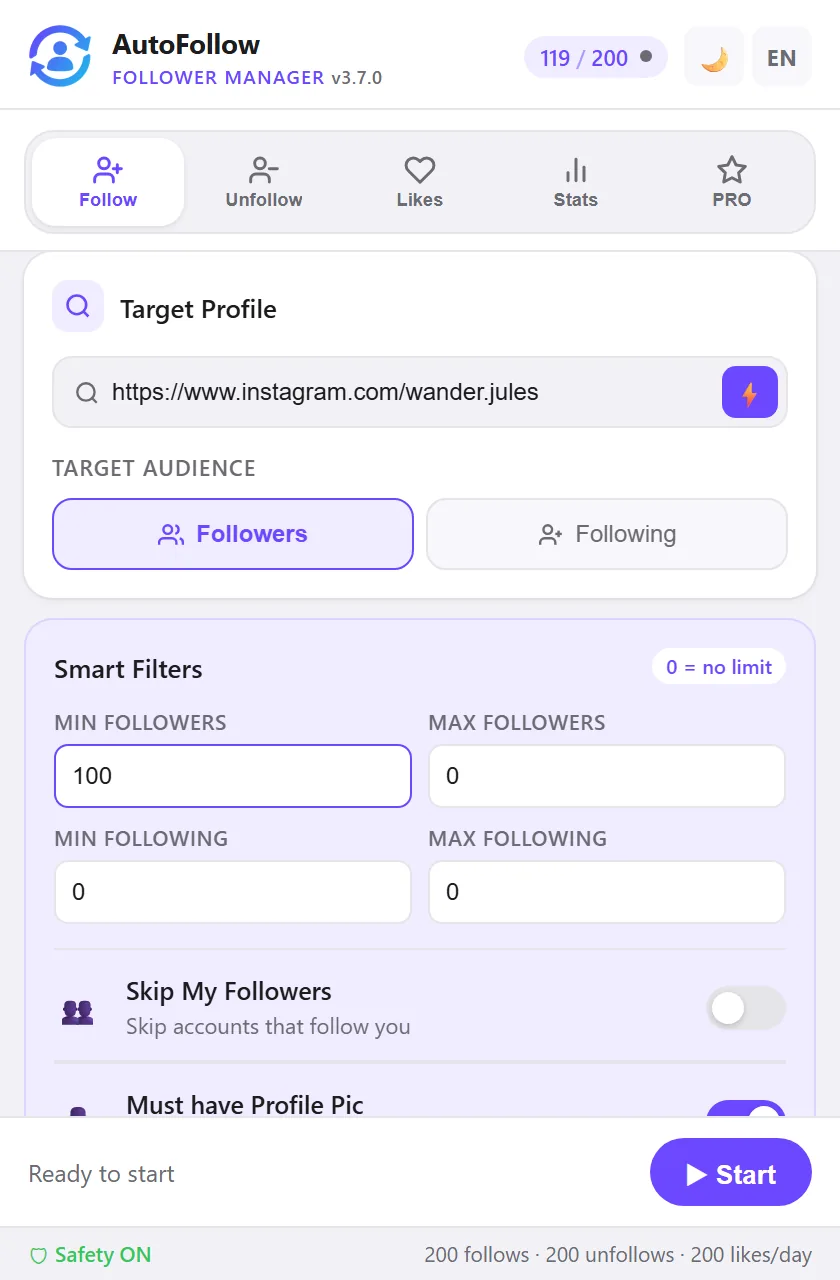
- Open the Follow tab and target your own profile. Paste your own Instagram URL in Target Profile, or press the lightning button while your profile is open in the tab. Choose Followers as the audience.
- Switch Skip My Followers off. This toggle is on by default because, for normal growth, you do not want to follow people who already follow you. For a follow-back session it is the opposite: your followers are exactly the audience, so the toggle must be off, otherwise every single person would be skipped.
- Set the filters. Keep Must have Profile Pic on, and consider a maximum following count, so you skip the accounts that follow thousands of people and will not see your posts anyway. Skip Private Accounts is optional; private followers are often real people.
- Set a daily limit you are comfortable with. The free plan allows 7 follows a day; PRO (€9.99/month) goes up to 200 with a slider. On a new or small account, start around 20 to 40 a day and climb slowly; the follow limit guide has the full ramp.
- Press Start. The extension works through your followers list newest first, waits a random 4 to 15 seconds between actions, logs every follow, and stops when the limit is reached. Press Start again tomorrow and it continues where it left off.
What about people you already follow? Two cases. Anyone AutoFollow followed itself, and anyone in your one-click snapshot (PRO: Protect everyone I follow right now, on the Unfollow tab), is skipped before any action. Anyone you followed by hand and never protected gets a follow request that Instagram treats as already done: nothing changes on Instagram, but it counts as one action against your daily limit and takes one wait. So on an account with many mutuals, press the snapshot button once before the first follow-back session; the whole current following list is then skipped.
Who not to follow back
A follow back is a small vote of attention, and your following list is visible to everyone who visits your profile. Keep it a list of accounts you would actually watch. The accounts worth skipping:
- No profile picture. Empty accounts follow in bulk and never engage. The filter handles this for you.
- Following thousands, followed by few. These accounts run follow-for-follow churn: they follow you today and unfollow you next week. Following them back only feeds the cycle.
- Accounts that do not look like a person or a business. A grid of stock images and no posts is not an audience.
- Anyone you would be embarrassed to be seen following. Your following list says as much about you as your followers do.
If you want the reverse view, the guide to finding who doesn't follow you back covers the three ways to check your own list, and how to clean it up without losing friends.
Does following back help you grow?
Plainly: it helps you keep followers more than it helps you gain them. People who get a follow back are more likely to stay, to watch your stories and to comment, because the relationship now runs both ways. What it does not do is bring new people in; for that you follow a targeted audience and measure who follows back. Our own campaign data lives on the follow-back rate page, and it concerns outbound follows, not follow-backs, so we make no claim about how many extra followers a follow-back routine brings. Treat it as hygiene: cheap, friendly, and worth doing every few days once the list is longer than you can handle by hand.
One habit that protects the account: do not mix a follow-back session with a big outbound session on the same day. A follow-back session uses the same daily follow limit as any other follow session, and Instagram counts the total, and a quiet, steady pattern is the one that never gets flagged. The safety guide explains what Instagram actually watches for.
Frequently asked questions
Does Instagram have an auto follow back setting?
No. Instagram has no setting that follows people for you. The closest thing is an option for private accounts that automatically approves follow requests from people you already follow. It accepts requests; it never sends a follow. Following your new followers back has to be done by hand or with a tool that works in your browser.
Why does my private account accept followers automatically?
Either the auto-confirm option for private accounts is on, or an app you connected to your account is doing it. Check the option under your profile menu, in the follow and invite settings, and review connected apps under Website permissions. If you see an app you do not recognize, remove it and change your password.
Can AutoFollow follow back everyone who follows me?
Yes. Set the Target Profile to your own username, choose Followers as the audience, and switch Skip My Followers off, otherwise every one of your followers would be skipped. The session then follows your followers at a human pace, within your daily limit, applying the filters you set. Accounts the extension already followed, or that you protected with the one-click snapshot, are skipped; anyone else you follow by hand simply counts as one action that Instagram treats as already done.
Will following back hurt my account?
Following back is ordinary behavior on Instagram, but a burst of hundreds of follows in one sitting looks automated on any account. Keep the daily limit modest, let the extension wait its random 4 to 15 seconds between actions, and start lower on a new account. AutoFollow also backs off on its own the moment Instagram refuses an action.
Should I follow back everyone?
No. Skip accounts without a profile picture, accounts that follow thousands of people with few followers, and anything that does not look like a person or a business you would actually watch. Your following list is part of your profile: a list full of empty accounts tells visitors, and Instagram, the wrong story.
Will the extension unfollow those people later?
Only if you run an unfollow session, and even then Skip Mutual Followers is on by default, so anyone who still follows you is left alone. You can also add people to the Safe List, which is never unfollowed by any session.
Follow Back Your New Followers Without the Tapping
Your own profile as the target, your followers as the audience, a limit you set. Free to start, inside your own browser, no password ever.
Add AutoFollow to Chrome