What auto like is for, plainly
Let's be straight: liking posts will not, by itself, grow an account. What consistent liking does is keep your account present — every like puts your name in someone's notifications, warms up the accounts you interact with, and keeps your activity pattern looking like a real, engaged user rather than a profile that only ever follows. That's why the instagram auto like extension works best as the third leg of the loop, next to targeted auto follow and protected auto unfollow.
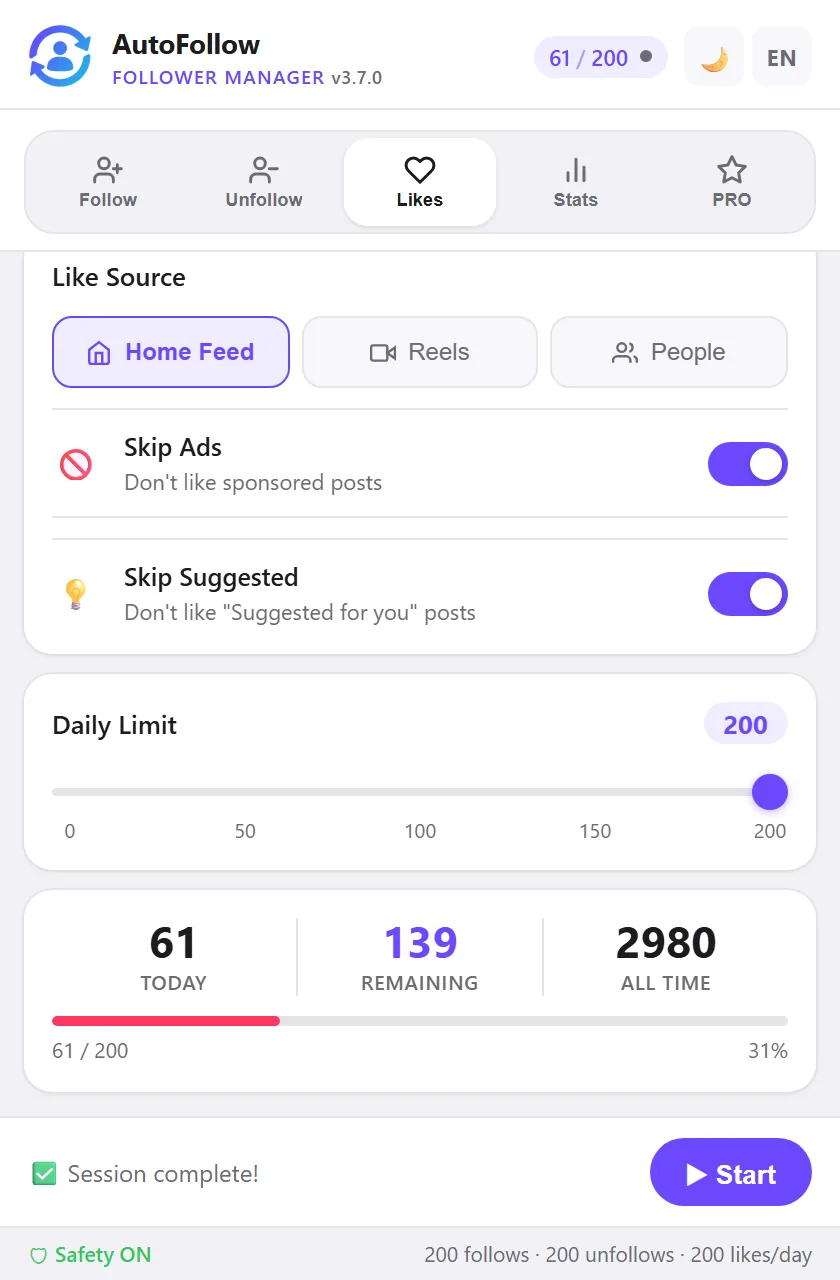
Three sources: your feed, Reels, or People
Choose where the session runs:
- Home feed — the extension scrolls your feed naturally and likes the posts it passes, exactly as a person browsing would.
- Reels — the same behavior inside the Reels player: watch, like, move on, with natural timing between videos.
- People — one like on the newest post of each account in a list: the people you follow, or the followers of any public profile you choose.
All three share one daily limit, one pacing engine and one activity log, so you always know what was liked and where.
People: one like on the latest post of every account you follow
The feed only shows you what Instagram decides to show. Plenty of the accounts you follow never appear there, and those are exactly the relationships that go cold. People goes through the list itself instead: it opens each account, finds its newest post, and leaves one like. Pinned posts don't fool it — it picks the most recent one by date.
- Your own following list — leave the profile field empty and every account you follow gets a quiet "still here" from you. It's the gentlest way to stay visible to the people who matter, and a reason for them to look at your latest posts.
- The followers of any public profile — type a profile (or press ⚡ on the page you're on) and choose Followers or Following. A like is a softer first touch than a follow: warm up a competitor's audience with likes, then follow the ones that look right with targeted auto follow.
It stays polite by design: one like per account, only on the newest post, and never twice — if you already liked it, the account is skipped, and the extension remembers who it liked for a week. Private accounts you don't follow and accounts without posts are skipped too.
Skip Ads & Skip Suggested: ads and recommendations stay untouched
Nothing looks worse in your like history than a trail of liked advertisements. With Skip Ads enabled, the extension detects sponsored content on the feed and in Reels — including the sneaky ads that hide their label and only reveal themselves through a "Shop now" or "Sign up" button — and scrolls past without liking. This detection was engineered specifically for Reels, where Instagram formats ads differently than on the feed.
A separate Skip Suggested option does the same for "Suggested for you" posts: with it enabled, your likes go only to content from accounts you actually follow — not to whatever Instagram's recommendation engine slipped into your feed. Two toggles, and your like history contains exactly what you'd have liked yourself. (The full "what gets liked vs what gets skipped" table lives on the features & filters page.)
Human pacing, hard limits, automatic back-off
Every like waits a random 4–15 seconds after the previous one. Longer sessions include cool-down breaks. If Instagram temporarily refuses actions, the extension backs off automatically instead of insisting — and the session log tells you exactly what happened. The daily ceiling is yours: 7 auto likes per day on the free plan, up to 200 per day with the PRO slider. The extension never crosses the limit you set.
How we run it on the accounts we manage
- Follow brings them in, likes keep them. Once people follow you back, their posts fill your feed — a Home Feed or People session keeps the relationship warm, and they like your posts back.
- Post something before a big like session. People who get a like look at your profile; give them something fresh to find.
- Spread it out. Run likes on the days you don't follow, or after a follow session — not everything in one hour.
Free vs PRO for auto like
| Free | PRO — €9.99/month | |
|---|---|---|
| Auto likes per day | 7 | Up to 200, adjustable slider |
| Home feed & Reels modes | ✔ | ✔ |
| People: newest post of each account you follow (or of any public profile's followers) | ✔ | ✔ |
| Skip Ads protection | ✔ | ✔ |
| Skip "Suggested for you" posts | ✔ | ✔ |
| Live session log & pause/resume | ✔ | ✔ |
The free quota renews daily with no credit card. Everything else you might wonder about — safety, privacy, billing — is answered in the FAQ.
Frequently asked questions
What does an Instagram auto like extension do?
It likes posts for you, automatically, inside your own browser. AutoFollow scrolls your home feed or Reels the way a person would, likes posts at a random 4–15 second pace, takes cool-down breaks, and stops when it reaches the daily limit you set — 7 likes per day on the free plan, up to 200 per day on PRO.
Does it like sponsored posts and ads?
Not if you keep Skip Ads on. The extension detects sponsored posts on the feed and sponsored Reels — including ads that only reveal themselves through a call-to-action button — and scrolls past them without liking. A separate Skip Suggested option also skips "Suggested for you" posts, so your like history contains only content from accounts you actually follow.
Does auto liking help my Instagram growth?
Likes are the lightest touch in the engagement loop: they make your account visible in notifications without the commitment of a follow. Used alongside targeted following, consistent liking keeps your account active and reciprocal. To be clear, liking alone will not grow an account; it supports the follow/follow-back loop rather than replacing it.
Can it like Reels too?
Yes. Auto like works both on your classic home feed and in the Reels player, with the same pacing, the same daily limit and the same Skip Ads protection in both places.
Can it like the latest post of everyone I follow?
Yes — that is the People source. It goes through the accounts you follow, opens each one, and leaves one like on its newest post (pinned posts are ignored). Accounts whose newest post you already liked are skipped, and the session stops at your daily limit: 7 on the free plan, up to 200 on PRO.
Can it like the posts of another account's followers?
Yes. In People, type any public profile and choose its Followers or Following list. Each account gets one like on its newest post. It is a softer first contact than a follow, which makes it a good way to warm up a competitor's audience before you follow the best of them.
Will Instagram notice the automation?
The session is built to look human: random delays between likes, natural scrolling, cool-down breaks, and a hard daily cap. If Instagram temporarily refuses actions, the extension backs off on its own instead of pushing through. Automation always carries some platform risk, so start with conservative limits.
Keep Your Account Active on Autopilot
Install free, choose feed or Reels, switch Skip Ads on, and let the likes go out at a human pace. New members get 10 days of PRO free in the community.
Add AutoFollow to Chrome