Targeted Auto Follow
Point at any profile and automatically follow its followers or following list — the exact audience already interested in your niche.
How auto follow works →AutoFollow is a smart auto follow & auto unfollow Chrome extension for Instagram. Target the right audience, set safe daily limits, and let human-like automation do the repetitive work — right inside your own browser.
★ 4.8 on the Chrome Web Store (6 reviews) · 249 users · Updated October 26, 2026 (v3.7.0)
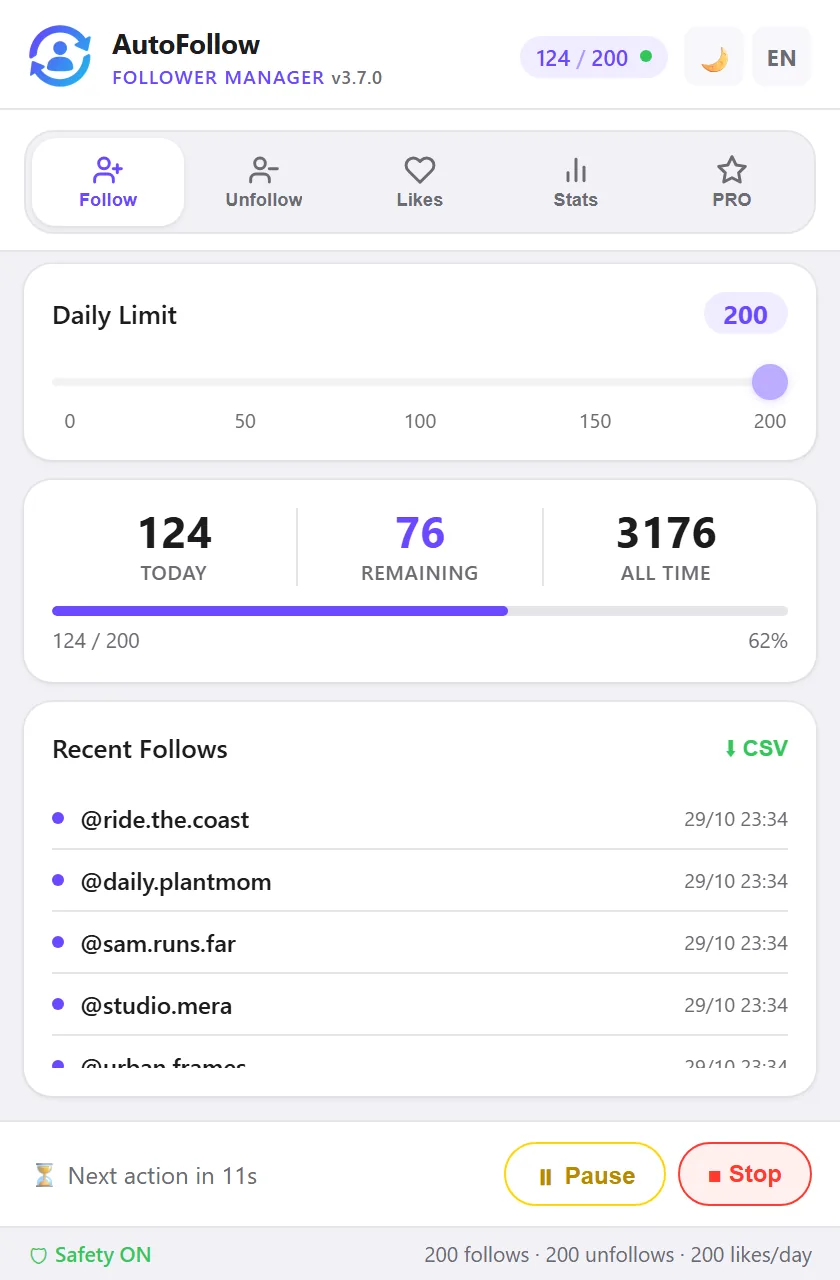
One extension replaces hours of manual tapping: targeted auto follow, protected auto unfollow, auto like, activity analytics and clean CSV exports.
Point at any profile and automatically follow its followers or following list — the exact audience already interested in your niche.
How auto follow works →Drop a post URL and follow the users who liked or commented on it — engaged, active accounts instead of random ones.
Clean up who doesn't follow you back. Add anyone to a Safe List, protect your Close Friends straight from your phone (PRO), skip mutuals, and give fresh follows a grace period you set from 1 to 10 days.
How auto unfollow works →Like your home feed, Reels, or the newest post of every account you follow — one like each, never twice. Skip Ads and Skip Suggested keep sponsored posts untouched.
How auto like works →Filter targets by min/max followers, min/max following and profile picture, skip people who already follow you — and never follow the same account twice.
A live chart shows everything the extension did for you — follows, unfollows and likes, per day — over 7 days, 1 month or 3 months, plus all-time totals. Unfollow history exports to CSV on PRO.
Random 4–15 second delays between actions and automatic cool-down breaks make every session look like a real person browsing — never a robotic burst of clicks.
Adjustable daily ceilings for follows, unfollows and likes, and Auto-Day Mode that splits your daily limit into multiple natural sessions.
Watch every action in real time: a full activity log with skip reasons, live progress, and pause/resume controls that survive browser restarts.
| Attribute | Answer |
|---|---|
| Type | Chrome / Chromium browser extension (desktop) |
| Main functions | Auto follow, auto unfollow, auto like |
| Target sources | Profile followers or following · post likers or commenters |
| Password required | No — runs in your existing Instagram session |
| Free plan | 7 follows + 7 unfollows + 7 likes per day, renews daily |
| PRO plan | €9.99/month — up to 200 follows, 200 unfollows and 200 likes per day, adjustable sliders |
| Data sent to our server | Instagram user ID + daily action counts only |
| Installation | Chrome Web Store · works on Chrome, Edge, Brave, Opera |
The short version of our sourced comparison, including where we are behind.
| What people compare | AutoFollow |
|---|---|
| Free plan | Yes, forever (7 + 7 + 7 a day), not a timed trial |
| Price | One plan, €9.99/month, cancel anytime; existing subscribers keep their price |
| Password or login | Never asked; runs in the Instagram tab you already have open |
| Follow + unfollow + likes in one tool | Yes, including Close Friends protection and People likes |
| Maintenance | Updated November 4, 2026 (v3.7.1); Instagram changes are usually patched within a day |
| Reviews | 4.8★ from 6 reviews; the category leaders have hundreds, we are the newer listing |
Full sourced comparison of 8 tools → · Switching from Growbot? →
Written from running accounts, with sources. Read these first if you are new to automation.
Five steps: pick an audience, filter it, set a daily limit, start, measure follow-backs.
The one official number (7,500 total), what the rest of the internet guesses, and a safe pace by account age.
What "Try again later" means, how long it lasts, and how to tell a real block from a broken tool.
Three ways to find non-followers, from Instagram's own data export to a one-click cleanup.
Safe List, Close Friends, mutuals and the grace period: keep the people you care about.
The private-account setting that only approves requests, and how to follow your new followers back in bulk, safely.
From install to your first automated session in under two minutes — no sign-up, no configuration files, no password.
Add AutoFollow to Chrome with one click. The extension lives in Chrome's side panel, right next to the Instagram tab you're already logged into.
Choose a competitor's profile or a viral post in your niche, select followers, likers or commenters, and dial in smart filters plus your daily limit.
The extension follows, unfollows or likes at a human pace while the live dashboard logs every action. Pause anytime — it resumes right where it left off.
Aggressive automation gets accounts flagged. AutoFollow was designed the opposite way: conservative defaults, transparent limits, and behavior that mimics how a real person uses Instagram.
The automation runs inside your own browser session — no password form, no API key, no separate account. Your posts, messages and follower lists are never read or uploaded; only your Instagram user ID and daily action counts sync to our server to enforce plan limits. For the full, no-sales-pitch picture, read the deep-dive: is Instagram automation safe? Already seeing "Try again later"? Read this first →
A name, not a faceless "team": the extension is designed, coded and supported by one person, with the agency behind him.
Founder of PIXON, a digital agency running since 2007 that manages Instagram accounts for clients. AutoFollow started as the in-house tool for that daily work and became a product in 2026. Every Instagram change is tested on live client accounts before a fix ships.
Email info@igautofollow.com, or ask in the Discord community where the developer answers questions and PRO members get a lounge. Bug reports usually get a reply the same day.
Our own campaign numbers (follow-back rate), a dated changelog for every release, and comparisons that say where competitors beat us. The terms name the company behind the subscription.
For social media managers and agencies: what one install does, and what each extra account needs.
| Question | Answer |
|---|---|
| Can one install handle several accounts? | Yes. The extension works with whichever Instagram account is logged in to the tab, and every account keeps its own daily quota, warm-up record, Safe List and history. |
| How do I switch accounts? | The clean way is one Chrome profile per Instagram account: each profile has its own login and its own copy of the extension, so sessions never mix. Switching accounts inside one tab also works, one account at a time. |
| What does PRO cover? | One PRO subscription is linked to one Instagram account. A second account you want at PRO volume needs its own subscription at the same €9.99/month; there is no agency bundle yet. |
| Can two accounts run at the same time? | Yes, in two Chrome profiles. Keep each one inside its own daily limit; Instagram judges every account separately. |
| Client reporting | The Stats tab shows follows, unfollows and likes per day for the account in the tab, and PRO exports the follow and unfollow history as CSV. |
Managing many accounts and need something the table does not cover? Tell us what; agency needs shape the roadmap.
Start free — your daily quota renews every day. Upgrade only if you want more volume.
Everything people ask before installing the auto follow & unfollow extension.
AutoFollow has a free plan with 7 auto follows, 7 auto unfollows and 7 auto likes every day — the quota renews daily and no credit card is required. The PRO subscription (€9.99/month) unlocks up to 200 follows, 200 unfollows and 200 likes per day, adjustable limit sliders, all advanced filters and priority support.
AutoFollow is built around safety-first automation: it simulates human behavior with 4–15 second random delays between actions and automatic cool-down breaks, enforces daily limits you control, and backs off automatically the moment Instagram starts refusing actions. Automation always carries some risk on any platform, so we recommend starting with conservative daily limits and increasing them gradually.
No. AutoFollow never asks for your password. It works inside your own browser using the Instagram session you are already logged into. Your posts, messages and follower lists are never read or uploaded — the only things sent to our server are your Instagram user ID and daily action counts, used to enforce plan limits.
You pick the audience. Target any profile and follow its followers or following list, or target any post and follow the users who liked or commented on it. Smart filters then refine the audience by minimum/maximum follower count, following count and profile picture, so you only follow accounts that match your niche — and it never follows the same account twice. You can even target a private profile you already follow, since its follower list is visible to you.
Yes. Enable Skip Mutual Followers and the auto unfollow tool will only remove accounts that don't follow you back. You can also add anyone to a protected Safe List that is never unfollowed, require manual confirmation for each unfollow, and skip accounts followed within the last 7 days.
AutoFollow is a Manifest V3 extension for Google Chrome and installs from the Chrome Web Store. It also works on other Chromium-based browsers such as Microsoft Edge, Brave and Opera.
See all 20+ questions in the full Instagram automation FAQ →
249 Chrome users run their targeted follow, cleanup and engagement work with AutoFollow, at a human pace, inside their own browser. Free to install, running in under two minutes.
Add AutoFollow to Chrome