What Autopilot does, in one paragraph
Without Autopilot you open the panel, pick a profile, press Start, wait for the session to end and do it again tomorrow. With Instagram Autopilot you set it up once. From then on it follows new people from the accounts you chose, likes posts, and unfollows the people who didn't follow back, a few at a time, with a break after every round. It spreads your daily limits over your hours, so the day's work never finishes by noon, and it starts again on its own the next day.
Set it up in three steps
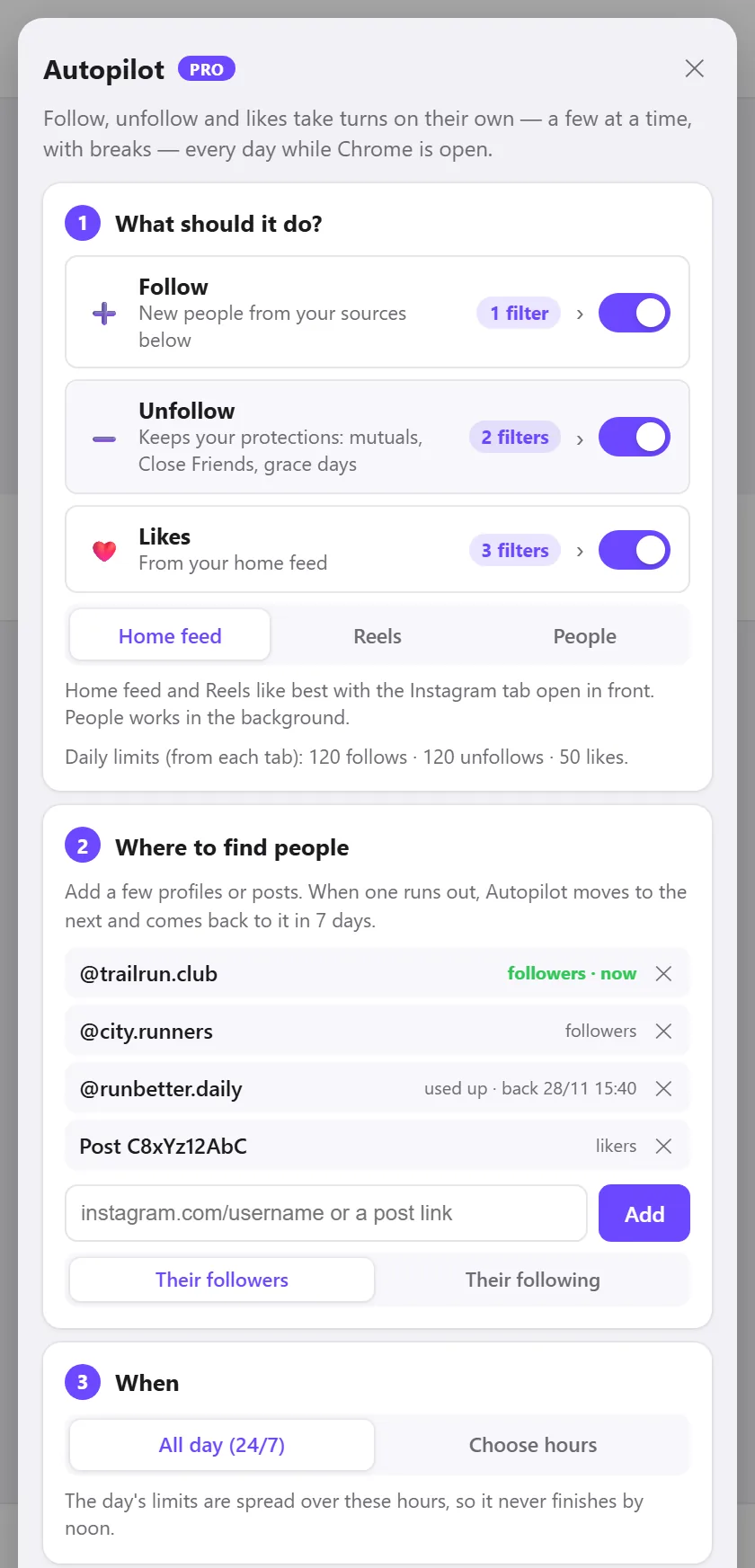
- What should it do? Switch Follow, Unfollow and Likes on or off. Each one uses the filters and the daily limit you already set in its own tab, so auto follow, auto unfollow and auto like behave exactly as when you run them by hand. Likes can come from your home feed, Reels, or People.
- Where to find people. Add a few public profiles or post links from your niche (up to 10), and choose their followers, their following, or the people who liked the post. When one source runs out, Autopilot moves to the next and comes back to it in 7 days.
- When. All day (24/7), or only the hours you choose; a window can even cross midnight, like 22:00 to 06:00.
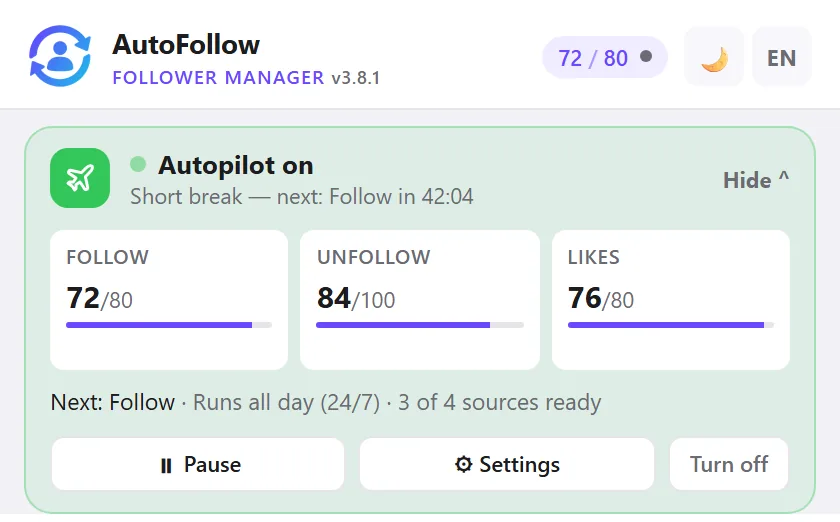
Press Start and close the panel. The card at the top of the panel always shows what it is doing now, what comes next, and how far each action is today.
The niche is the whole trick
Autopilot is only as good as the sources you give it. People who follow an account in your niche, or liked a post about your topic, are the people most likely to follow you back. Three or four good sources keep it busy for days:
- A profile like yours, a bit bigger. Its followers already like this kind of content.
- A recent post that did well in your niche. The people who liked it are active right now.
- A local or community account, if your audience is in one city or one scene.
Every few days, add a new source and remove the ones that brought little. That is all the maintenance it needs. Picking sources is explained in more depth on the auto follow page.
How it paces itself
A person doesn't follow 200 accounts in one sitting, and neither does Autopilot:
- Small rounds. Each round is 4 to 10 actions, sized so that follows, likes and unfollows all finish around the same time of day.
- Turns. It goes follow, like, tidy up (unfollow), and starts over, instead of running one action until it hits the limit.
- Breaks. After every round it rests 2 to 45 minutes, a different length every time, longer when there is little left to do.
- Your limits, spread out. The daily limits from each tab are divided over your hours. With the PRO warm-up they start where your account is and grow with it; see how many follows per day make sense.
When Instagram says "slow down"
Every account meets a limit sometimes. What matters is what the tool does next. If Instagram refuses an action, Autopilot stops only that action for the rest of the day; the others keep their turns. The next day the action comes back at half its limit, then 75%, then 100%. If Instagram asks you to confirm something on your account, or you have been logged out, Autopilot stops completely and tells you, because that needs you, not another try. More about what a block is and how long it lasts: Instagram action blocked.
What you need
- The computer on and Chrome open, signed in to Instagram. AutoFollow runs in your browser, not on a server, so nothing logs in as you from somewhere else.
- An Instagram tab. If it closes, Autopilot opens it again in the background and carries on. Home feed and Reels likes work best with that tab in front; People likes and everything else work in the background.
- PRO. On the free plan you can open the Autopilot settings and see everything; with PRO it runs every day.
Pause keeps everything as it was, including the current break. Turn off ends it until you press Start again.
Manual sessions vs Autopilot
| Manual (Free & PRO) | Autopilot (PRO — €9.99/month) | |
|---|---|---|
| Start | You press Start for every session | Once; it runs every day on its own |
| Actions | One at a time: follow, unfollow or like | All three, taking turns |
| Sources | One profile or post per session | A list; moves on when one runs out |
| Pacing | Human delays within a session | Human delays, plus rounds and breaks spread over your hours |
| After a block | That action pauses, you decide when to try again | That action rests today, then 50% → 75% → 100% |
| Daily limits | Free 7/7/7 · PRO up to 200/200/200 | Your PRO limits from each tab |
Questions about safety, privacy or billing are answered in the FAQ and in is Instagram automation safe?
Frequently asked questions
What is Instagram Autopilot in AutoFollow?
It is the PRO mode that runs follow, unfollow and likes for you every day. You choose which actions are on, add a few profiles or posts from your niche, and pick the hours. Autopilot then takes turns between the actions in small rounds of 4 to 10, with breaks of 2 to 45 minutes, and spreads your daily limits across your hours.
Do I need to keep my computer on?
Yes. AutoFollow runs inside your own Chrome, not on a server, so the computer has to be on and Chrome open, signed in to Instagram. If the Instagram tab closes, Autopilot opens it again in the background and carries on. When the computer sleeps, Autopilot simply continues when it wakes up.
What happens if Instagram blocks an action?
Only that action stops, for the rest of the day; the other actions keep their turns. The next day it comes back at half its limit, then 75%, then 100%. If Instagram asks you to confirm something on your account, or you are logged out, Autopilot stops completely and tells you, because that needs you.
Where does Autopilot find people to follow?
From the sources you add: the followers or following of any public profile, or the people who liked a post. Pick accounts and posts from your own niche. When a source runs out, Autopilot moves to the next one and comes back to it in 7 days. A link that doesn't work is tried again the next day.
Does it use my filters and protections?
Yes. Autopilot uses the same engines and settings as the Follow, Unfollow and Likes tabs: the follow filters, the Safe List, mutual followers, Close Friends and grace days for unfollow, and Skip Ads for likes. The daily limits also come from each tab.
Is Autopilot free?
Autopilot is part of PRO, €9.99 per month. On the free plan you can open its settings and see everything it does. New members of the AutoFollow community on Discord can get 10 days of PRO free to try it.
Is Instagram automation with Autopilot safe?
Autopilot is built to act like a person: small rounds, random breaks, limits spread over the day, and an automatic back-off when Instagram refuses actions. No tool can promise that an account will never be limited, so start with moderate limits and let them grow.
Set It Up Once, Let It Run
Install free, look through the Autopilot settings, and switch it on with PRO. New members get 10 days of PRO free in the community.
Add AutoFollow to Chrome